The Best Memory Cards for Speed, Reliability, and 4K Video
The best memory card is not necessarily the one with the highest number printed on the label. It is the card that matches your camera’s slot, recording format, shooting speed, and workflow without slowing you down or putting valuable images at unnecessary risk.
For casual photography, a reputable SD card with enough capacity and a suitable speed rating may be all you need. High-resolution burst shooting, 4K video, and professional workloads can demand something faster—sometimes much faster. Understanding the specifications makes it easier to spend money where it matters and avoid paying for performance your camera cannot use.
Start with your camera’s card format
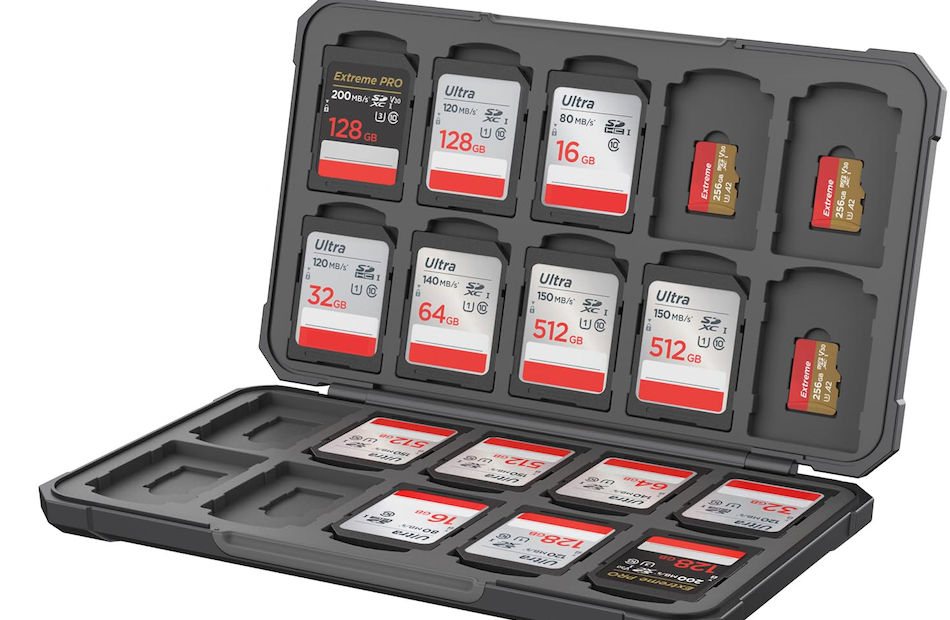
Before comparing speed ratings, check which memory card your camera accepts. The main formats used in modern cameras are SD, microSD, and CFexpress.
- SD cards are widely used in mirrorless cameras, DSLRs, compact cameras, audio recorders, and many video devices.
- microSD cards are common in action cameras, drones, compact devices, and some cameras that use an adapter.
- CFexpress cards are designed for demanding cameras that need high sustained write performance, such as models aimed at fast continuous shooting or advanced video recording.
A card may physically fit through an adapter but still not provide the performance or compatibility your camera needs. A microSD card in an SD adapter, for example, does not automatically become as fast or as robust as a full-size SD card. Check the camera manual for approved formats, maximum capacities, and recording restrictions.
Understand the speed ratings
Memory-card packaging can show several different speed markings. They do not all describe the same thing, which is why a card labelled “fast” may not be suitable for every camera or recording mode.
Read speed and write speed
Read speed describes how quickly data can be transferred from the card to a computer or card reader. It affects how long it takes to copy photos and video.
Write speed is more important while shooting. It describes how quickly the card can accept data from the camera. A fast write speed helps clear the camera’s buffer after a burst and is essential for video recording, where data must be written continuously.
Maximum read and write figures printed on the label are often peak or ideal figures. They may not represent the speed maintained during a long transfer or sustained recording session. For demanding work, look for a clearly stated minimum sustained write rating as well as the headline speed.
SD speed classes
SD cards use several symbols to indicate minimum write-performance classes:
- Class 10 indicates a minimum sequential write speed of 10 MB/s.
- U1 and U3 are UHS Speed Class ratings. U1 indicates 10 MB/s, while U3 indicates 30 MB/s minimum sustained write speed.
- V30, V60, and V90 are Video Speed Class ratings indicating minimum sustained write speeds of 30, 60, and 90 MB/s respectively.
These are minimum classifications, not promises that every card will perform at exactly that speed in every camera. A UHS-I card and a UHS-II card may both carry a U3 rating, but the newer UHS-II interface can support higher transfer performance when both the camera and reader support it.
UHS-I and UHS-II
UHS refers to the bus interface used by an SD card. UHS-II cards have an additional row of contacts and can offer substantially faster transfers than UHS-I cards when used with compatible equipment.
If your camera has a UHS-II slot, a suitable UHS-II card can be worthwhile for clearing bursts and moving large files. In a UHS-I-only camera, a UHS-II card may still work if it is backward-compatible, but it will generally operate at the slower interface speed. You will not get the full benefit simply by inserting a faster card into an older slot.
Choosing a card for 4K video
For 4K video, the key question is not only resolution. Bit rate, codec, colour depth, frame rate, and the camera’s recording method all affect how quickly data must be written.
Many cameras can record less demanding 4K modes to a good U3 or V30 SD card. Higher-bit-rate options, intraframe codecs, high frame rates, and some 10-bit recording modes may require V60 or V90 performance—or a CFexpress card. The camera manufacturer’s recording table is the final authority.
Do not confuse a card’s UHS bus designation with its UHS Speed Class. UHS-II describes the interface; U3 describes a minimum sustained write class. A card can have one without the other, so check both when choosing a card for video.
For long takes, sustained performance matters more than a brief peak speed. If the card cannot maintain the required write rate, recording may stop, the camera may refuse a selected format, or the available recording options may be restricted.
When CFexpress is the better choice
CFexpress cards are used in cameras that need very high data throughput. They are particularly relevant for high-speed bursts, large raw files, demanding video codecs, and workflows where fast offloading saves significant time.
CFexpress comes in different physical types, including Type A and Type B. They are not interchangeable: a camera designed for Type A requires Type A, while a Type B camera requires Type B. CFexpress cards also need a compatible reader to achieve their intended transfer performance.
These cards can be considerably more expensive than SD cards, and the camera—not the card alone—determines whether the extra performance is useful. If your camera records modest video files and has a UHS-I SD slot, buying CFexpress is not an upgrade you can use through an adapter.
How much storage do you need?
Capacity depends on file size, shooting habits, and how often you can copy or replace cards. Raw stills, high-resolution JPEGs, burst sequences, and video can consume space quickly. A high-capacity card is convenient, but it is not always the safest approach for an important assignment.
Using several medium-capacity cards can reduce the number of images at risk if one card fails. This can be practical for weddings, travel, and multi-day shoots, where changing cards also creates natural opportunities to separate completed work from unused capacity.
For video, estimate capacity from the camera’s stated recording time or data rate for the chosen mode. Leave headroom rather than filling a card to its final few megabytes, and carry more storage than your planned minimum when access to a computer or replacement cards may be limited.
Reliability matters more than impressive packaging
Buy memory cards from established manufacturers and reputable retailers. Counterfeit cards are a real concern when prices seem unusually low, particularly on marketplace listings where the seller’s supply chain is unclear. A card that falsely reports its capacity can cause files to be overwritten or corrupted.
After buying a card, format it in the camera rather than relying on a computer’s default formatting process. Before an important job, test the card in the camera using the recording mode you intend to use. Record a sustained video clip or shoot a realistic burst, then copy and open the files on your computer.
Memory cards should be treated as temporary storage, not as a permanent archive. Copy files to at least one other storage location as soon as practical, and avoid deleting the card until the backup has been checked. Formatting a card does not repair a failing card, and recovery software is not a substitute for a backup system.
Match the card to the job
Everyday photography
For family photos, travel, landscapes, and general JPEG or raw shooting, a reputable SD card with a suitable capacity and U3 or V30 rating is often a sensible starting point, provided the camera supports it. A faster card may improve transfers, but it will not make autofocus or image quality better.
Action and wildlife
Fast subjects create a stronger case for high sustained write performance. If you use long bursts of raw files, choose the fastest card class and interface supported by the camera. A card that clears the buffer quickly can help you return to full shooting speed sooner, although the camera’s buffer size and processor remain important limits.
Professional and high-bitrate video
Follow the camera’s requirements for each codec and frame-rate combination. V60, V90, or CFexpress may be necessary for particular formats. Carry tested spare cards, label them clearly, and avoid mixing untested cards into a paid production.
The smartest memory-card purchase is a balanced one: the correct physical format, enough capacity for the assignment, a sustained write rating that covers your chosen recording mode, and a trustworthy source. Once those requirements are met, the most expensive card on the shelf is rarely the automatic best choice.