The Ultimate Guide to Aspect Ratio
Aspect ratio is one of those photography basics that quietly affects almost every image you make. It influences composition, cropping, print size, social media posts, monitor displays, and whether your carefully framed photo suddenly loses the subject’s feet when you export it.
The good news is that aspect ratio is simple once you stop treating it like technical jargon. It is just the relationship between an image’s width and height. Learn how a few common ratios behave, and you will make better framing decisions before you press the shutter—not only later in Lightroom or Photoshop.
What aspect ratio actually means
An aspect ratio compares the width of an image to its height. It is usually written with a colon, such as 3:2, 4:3, or 16:9.
A 3:2 image is three units wide for every two units high. The actual pixel dimensions can vary:
- 3000 × 2000 pixels
- 6000 × 4000 pixels
- 900 × 600 pixels
All three examples use a 3:2 aspect ratio because the proportions are the same.
Aspect ratio is not the same as resolution. Resolution describes how many pixels an image contains. Aspect ratio describes its shape.
For example, a 6000 × 4000-pixel photo has a 3:2 ratio. A 1500 × 1000-pixel version has the same ratio, but fewer pixels. One is larger and potentially better for big prints; both have the same rectangular shape.
Why aspect ratio matters in photography
Every camera format gives you a starting shape. That shape affects how you see a scene and where visual tension lands inside the frame.
A wide ratio can suit landscapes, environmental portraits, and scenes with movement across the frame. A squarer ratio can feel calmer, more contained, and more focused on a central subject. A tall vertical crop can add drama to architecture, fashion portraits, waterfalls, and anything with strong upward lines.
Aspect ratio also matters when your image leaves your editing software. If you shoot a photo in 3:2 but order an 8 × 10 print, the lab must crop part of the frame because 8 × 10 uses a 4:5 ratio. If you do not control that crop yourself, the print software may make a choice you would not make.
The most common aspect ratios
3:2 — the classic camera format
3:2 is the standard ratio for full-frame cameras, many APS-C cameras, and 35mm film. It is familiar because it has been used in photography for decades.
Common 3:2 print sizes include:
- 4 × 6 inches
- 8 × 12 inches
- 12 × 18 inches
- 20 × 30 inches
This ratio is fairly wide. In landscape orientation, it gives you room to include foreground, sky, or context around a subject. In portrait orientation, it works well for full-length portraits and street photography.
The downside is that 3:2 can feel a little loose if the edges of the frame do not contribute much. A modest crop to 4:3 or 5:4 can often tighten an image considerably.
4:3 — a practical, slightly squarer frame
4:3 is common on Micro Four Thirds cameras, compact cameras, and many smartphones. It is less wide than 3:2, which can make it easier to compose scenes with a strong central subject.
Typical 4:3 print sizes include:
- 4 × 3 inches
- 8 × 6 inches
- 12 × 9 inches
- 16 × 12 inches
This ratio is especially comfortable for travel photography, food photography, still life, and portraits where the background matters but does not need to stretch far across the frame.
Many phone cameras capture in 4:3 because it usually uses the full camera sensor. Choosing a “full screen” camera mode may create a wider crop, but it can also discard pixels. Check your phone’s camera settings if maximum image area matters to you.
1:1 — the square format
1:1 means the width and height are equal. Think 1080 × 1080 pixels or a 10 × 10-inch print.
Square images remove the question of whether a scene should be horizontal or vertical. That limitation can be surprisingly useful. It encourages you to pay closer attention to symmetry, repetition, negative space, and central composition.
Square crops work particularly well for:
- Close-up portraits
- Graphic architecture
- Minimalist landscapes
- Still life and product images
- Images built around symmetry
Instagram helped make the square format popular, but it has a much longer photographic history. Medium-format film cameras such as the Hasselblad made the square frame a serious creative choice long before social platforms existed.
4:5 and 5:4 — ideal for many prints and vertical posts
4:5 is the vertical version of 5:4. The ratio is common for 8 × 10-inch prints, 16 × 20-inch prints, and vertical Instagram feed posts.
A 4:5 vertical image uses dimensions such as 1080 × 1350 pixels. It fills more of a phone screen than a 3:2 vertical image, which is one reason it is popular for social posts.
For photographers, the important detail is that 4:5 is noticeably narrower than a standard 3:2 camera frame. If you plan to print portraits at 8 × 10 or 16 × 20, leave a little extra room around hands, hair, and feet while shooting.
Do not frame a person’s head tightly against the top edge and assume you can make an 8 × 10 later. You may have nowhere to crop.
16:9 — the widescreen ratio
16:9 is the standard shape for HD and 4K video, modern televisions, and many computer displays. It is also a popular crop for cinematic landscapes.
A 16:9 photo can look dramatic when the scene has strong horizontal energy: a coastline, mountain range, city skyline, road, or group of people spread across a space.
It is not automatically more cinematic, though. A wide crop should earn its width. If the left and right edges add nothing, the ratio can make the subject feel small rather than cinematic.
9:16 — vertical video and stories
9:16 is the tall, vertical format used for Stories, Reels, TikTok, and other phone-first video platforms. A common size is 1080 × 1920 pixels.
For still photographers, this ratio is useful when creating content designed specifically for a vertical screen. It can work beautifully for fashion, action, tall buildings, and portrait-oriented travel scenes.
Be careful with important details near the top and bottom. Interface elements, captions, and profile controls can cover parts of a vertical image or video depending on the platform.
How aspect ratio changes composition
Changing the crop does more than remove pixels. It changes visual balance.
Imagine a portrait of a cyclist standing on the right side of a 3:2 frame, with a long empty road leading in from the left. That wide composition may communicate distance and journey. Crop it to 4:5, and the cyclist becomes more dominant while the sense of place decreases.
Neither version is inherently better. They tell slightly different stories.
When testing crops, ask yourself practical questions:
- What is the real subject of this image?
- Do the edges support that subject or distract from it?
- Does the crop improve the balance of light and dark areas?
- Is there enough room in front of a moving person, animal, or vehicle?
- Will this image be printed, posted, displayed, or used in a layout with fixed dimensions?
A useful habit is to try two or three ratios during editing rather than automatically accepting the camera’s default. You may find that a nearly square crop gives a portrait more presence, while a panoramic crop gives a landscape better flow.
Aspect ratio and print sizes: avoid surprise crops
Printing is where aspect ratio causes the most frustration. Many popular print sizes do not match standard camera ratios.
Here is a quick reference:
- 3:2 photos: 4 × 6, 8 × 12, 12 × 18, 20 × 30
- 4:3 photos: 6 × 8, 9 × 12, 12 × 16
- 5:4 photos: 8 × 10, 16 × 20
- Square photos: 8 × 8, 12 × 12, 16 × 16
If your chosen print size does not match your file, you have three options:
- Crop the image to fit the print ratio.
- Add a border so the full image fits on the paper.
- Choose a different print size that matches the original file.
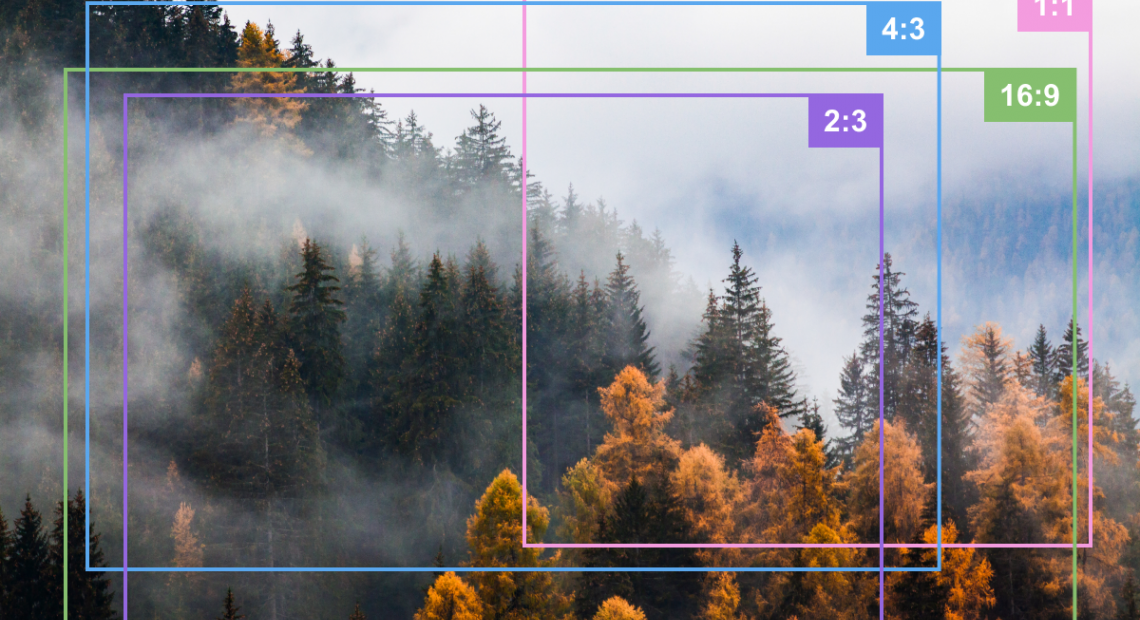
For important prints, crop the image yourself in editing software. Most programs offer crop overlays for common ratios, including 2:3, 4:3, 5:4, 1:1, and 16:9. Turn on the overlay, move the crop carefully, and check details near every edge.
A simple workflow for choosing the right ratio
You do not need to decide on one universal aspect ratio. Use the final purpose of the image as your guide.
- Start with your camera’s native ratio. It gives you the most pixels and the most cropping flexibility.
- Think about the intended destination. A gallery print, magazine layout, Instagram post, and YouTube thumbnail all have different needs.
- Compose with breathing room. Leave extra space around important details if you expect to crop later.
- Try the crop before editing heavily. There is little point perfecting a distracting edge that will disappear.
- Export separate versions when needed. One master edit can produce a 3:2 print file, a 4:5 social post, and a 16:9 website banner.
Keep the uncropped original or a master edited file. Social media formats change, clients change their minds, and a photo that looked best as a vertical post may later become a horizontal print.
Common aspect ratio mistakes
Forcing every photo into the same crop
Consistency is useful for a portfolio grid or a photo series, but forcing every image into 16:9 or 4:5 can weaken individual photographs. Let the content have a vote.
Cropping too tightly around people
Hands, elbows, feet, hair, and moving limbs need room. Tight crops can look intentional, but accidental clipping usually looks careless. Pay particular attention when converting 3:2 portraits to 4:5.
Ignoring where an image will appear
A photo that looks excellent on a wide monitor may not work in a tall mobile feed. Before exporting, check the destination’s preferred dimensions and preview the image at a realistic size.
Confusing ratio with orientation
A 3:2 image can be horizontal or vertical. Turn a 6000 × 4000 image sideways and it becomes 4000 × 6000, but the proportional relationship remains 3:2.
Make the frame part of the photograph
Aspect ratio is not a boring export setting to deal with at the end. It is part of the language of your photograph. A wide frame can create space and movement. A square frame can create order. A tall frame can make a subject feel powerful, isolated, or elegant.
Next time you edit a favorite image, make three versions: one in its original ratio, one square, and one in 4:5 or 16:9. Compare what changes—not just what gets cut off. You may discover that the strongest version of a photo was hiding inside the original frame. Which ratio do you reach for most often, and is it helping the image or simply becoming a habit?